
Every time a new student enrols, does your staff collect a paper form, enter the data manually, and then chase down parent contact details separately? An invitation code collapses that process into two steps: hand over the code, and let the parent register themselves. But assuming the job is done once you share the code is the mistake most schools make.
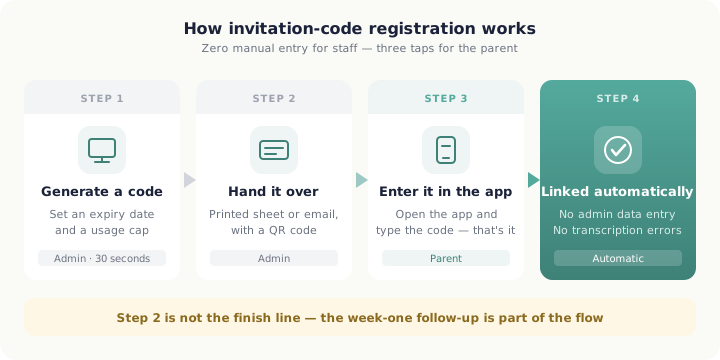 Handing over the code is step two of four — the week-one follow-up is part of the flow
Why invitation-code registration works now
Japan's smartphone household penetration reached 90.5% in 2024, and individual smartphone internet usage stood at 74.4% (Ministry of Internal Affairs and Communications, "2025 White Paper on Information and Communications" — household ownership / individual internet use by device). For parents in the 30–40s bracket — the tuition centre's core demographic — rates are even higher. The infrastructure to receive and use an invitation code is already in most parents' pockets.
"55.6% of parents feel that digital communication from their children's school has improved since before COVID, while over 70% want further digitalisation."
— Adobe Inc., "Survey on the Digitalisation of Printed Materials Children Receive", published 25 April 2023 (500 parents nationwide)
Parents are already willing. Invitation-code registration is the shortest path to meeting that expectation.
What changes with invitation codes
In E-Space, an administrator generates a code from the console and sets an expiry date and a maximum usage count. A parent who receives the code enters it in the app and is automatically linked to the correct classroom — no admin data entry needed.
① Fewer steps for parents means higher completion
Old flow: "receive an email → find the login page → enter classroom ID → wait for a confirmation code." Invitation-code flow: "receive code → open app → enter it." Fewer steps, fewer places to drop out.
② Zero manual data entry on the admin side
Parents enter their own name and email when creating an account. Once registered, they appear automatically in the management console. Manual transcription errors are eliminated because there is no manual transcription.
③ Controlled access per code
For a summer intensive or a trial cohort, you can cap a code at ten uses and set it to expire in two weeks. You open the door for exactly the right window without exposing the school to unlimited sign-ups.
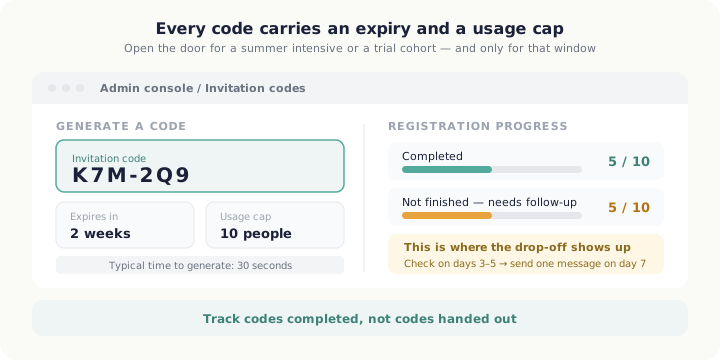 Track codes completed, not codes handed out
Three realities to prepare for
Invitation codes make registration easier. They do not make it automatic.
Reality 1. Admins need a learning curve too
The Tokyo Chamber of Commerce and Industry's "Survey on Digital Shift and DX at Small and Medium Enterprises" (published 10 January 2025; 1,218 Tokyo SMEs) found that while roughly 80% have introduced IT tools, only 52.7% have reached the level of actually using them to streamline work — and just 7.2% say they have adequate digital talent in-house. Tuition centres fit this profile. The person generating and distributing codes — the school owner or front-desk staff — may take one to two weeks to get comfortable with the console. Build that into your launch timeline.
Reality 2. Not every parent finds "easy" easy
MMD Research Institute's "2024 Survey on Smartphone Use Among Seniors" (published 17 January 2025) found that among 8,921 smartphone-owning seniors aged 60–79, 51.4% had needed someone else's help with their contract or day-to-day use — and 40.7% of those needed help with everyday use, not just setup. Some tuition centre parents fit this profile: grandparents handling drop-off, or adults still adjusting to smartphones. A one-page printed guide and an offer to help at the front desk during the first two weeks reduces this drop-off substantially.
Reality 3. The last mile is where registration collapses
Userpilot tracked 62 companies and found an average B2B SaaS activation rate of 37.5% — meaning almost two-thirds of people who sign up never reach the activation milestone. Amplitude's Product Benchmark Report (10,600+ products across 2,600+ companies) adds that more than 98% of users churn within two weeks if they have not experienced value. Sending an invitation code is not the end of the job — it is the beginning. Send one follow-up message in week one: "Were you able to register? Here's the setup guide if you need it." That single touchpoint measurably improves completion rates.
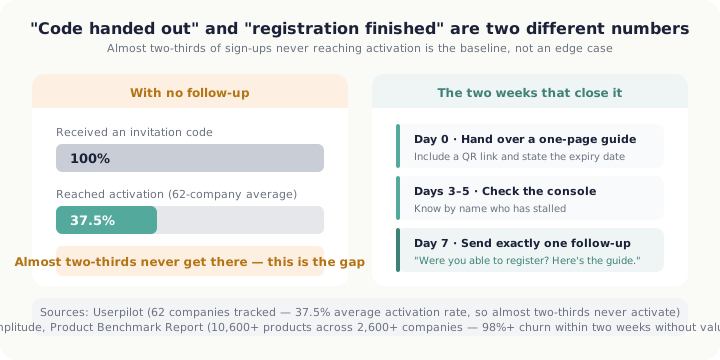 Almost two-thirds never reaching activation is the baseline, not an edge case — the first two weeks close it
First two weeks: a checklist
- Day 0: Generate the invitation code (set expiry and usage cap)
- Day 0: Distribute the code with a one-page setup guide (include a QR code link to the app)
- Days 3–5: Check the console for incomplete registrations
- Day 7: Send a follow-up to any parent who has not yet registered
- Day 14: Record overall registration rate; note what to improve next time
Whether or not you use invitation codes, onboarding ends when someone uses the tool — not when you hand over the credentials.
Summary
An invitation code is the shortest route from "new student enrolled" to "parent active in the app." But across the industry, almost two-thirds of people who sign up never reach activation on their own. That is not an edge case — it is the baseline when follow-up is skipped. Design the code distribution and the first-week follow-up as one flow, and the adoption rate you actually see will match the one you planned for.
References
- Ministry of Internal Affairs and Communications, "2025 White Paper on Information and Communications" (2025) — household ownership of devices (smartphones 90.5%) / internet use by device (smartphones 74.4%)
- Adobe Inc., "Survey on the Digitalisation of Printed Materials Children Receive", 25 April 2023 (500 parents nationwide)
- Tokyo Chamber of Commerce and Industry, "Survey on Digital Shift and DX at Small and Medium Enterprises", 10 January 2025 (1,218 Tokyo SMEs, PDF, Japanese)
- MMD Research Institute, "2024 Survey on Smartphone Use Among Seniors", 17 January 2025 (ages 60–79; 10,000 screened, 1,200 in the main survey, Japanese)
- Userpilot, "User Activation for SaaS" (62 companies tracked; 37.5% average activation rate)
- Amplitude, "Time to Value: The Key to Driving User Retention" (Product Benchmark Report; 10,600+ products across 2,600+ companies)