
When you first open a tutoring center, LINE is more than enough for talking to parents. One phone does the job, and parents already live in the app. (LINE is the dominant messaging app in Japan, much as WhatsApp or iMessage is elsewhere — the same logic applies to whatever messaging app your families already use.) But before long it's "did they even see that message?", "turns out they'd left the chat," "there's still a group full of graduated students." The longer you run a center on a consumer messaging app, the more invisible costs pile up.
This article lays out 6 signs you've hit the limits of messaging-app communication, the line at which it's worth switching to a dedicated app, and how to migrate without losing parents along the way.
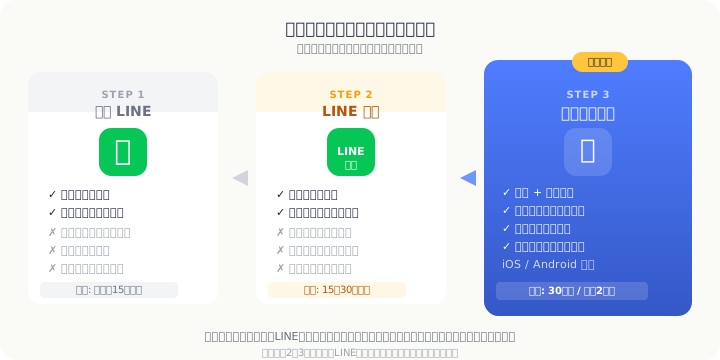 Parent communication evolves in three stages — pick the tier that matches your center's size
Why So Many Centers Start on LINE
Meeting parents where they already are
Parents in their 30s and 40s use LINE every day (per Japan's Ministry of Internal Affairs communications-usage survey). There's no new app to learn, and a strong "a LINE notification means it gets seen right away" culture is baked in — which makes it a sensible first channel when a center opens.
The appeal of zero upfront cost
A personal account is free, and spinning up a group takes no effort. With 10 students or fewer, you can stand up a communication setup without spending a yen.
The "a message arrived = it gets read" culture
Higher open rates than email, plus read receipts — that reassurance is what props up the "LINE is enough" judgment. But as your student count, tutor count, and message complexity climb, that same reassurance turns into a trap.
6 Signs You've Hit the Limits of Messaging-App Communication
Sign 1: Read receipts can't tell you "saw it but didn't take it in"
A "read" marker only means the chat was opened. Ever pushed out an important schedule change and still heard "I had no idea"? There's no way to confirm the understanding-and-action that lives beyond the read receipt.
Sign 2: Handling opt-outs and blocks is all manual
There's no list view telling you which parent left the group. A serious message never landing because someone quietly left — and you didn't notice — is the kind of trouble that gets more likely the more students you have.
Sign 3: The line between one-to-one and broadcast blurs
A private concern gets posted to the group; a schedule change gets sent in a one-on-one chat. Information scatters, and hunting for "where did I write that" becomes routine. Running a personal account also risks exposing a tutor's private profile to parents.
Sign 4: Searching past exchanges turns up nothing
"Where did I send last month's make-up date again?" — messaging-app search is weak, and once information is spread across multiple groups and one-on-one chats, you can't get back to the conversation you need. Its reliability as a record is low.
Sign 5: Groups and contacts linger after withdrawal
You have to remove a withdrawn family by hand, and if they stay in a group where another student's information is shared, that's a direct personal-data leak risk. Because it isn't tied to the withdrawal process, "already withdrawn but still in the chat" happens easily.
Sign 6: You can't hand it over when a tutor changes
If you run on a personal account, swapping the assigned tutor means handing over the parent contacts along with it. Parents being registered to a tutor's personal LINE rather than to the center is a seed of trouble when that tutor leaves.
Sidebar: the "open 24/7" problem of a personal account
Handle parent communication on a personal account and a "when's the next lesson?" message lands at 10 p.m. Not replying makes you look like you ignored them, which quietly puts tutors and staff permanently on call. It's a structural problem that bleeds into hiring and retention, too.
Where a LINE Official Account Falls Short
Plenty of directors think switching to a LINE Official Account solves it. It does clear up the "open 24/7" problem of a personal account and the mixing of private information. But for running a center, a different wall comes into view. Our 2026 comparison of tutoring management apps covers this too — line the three options up side by side and the differences are stark.
The wall of monthly fees and message caps
The free tier caps how many messages you can send (check the official site for the current numbers), and once you pass roughly 30 students, broadcasts alone burn through the allowance and force you onto a paid plan.
Read ≠ individual comprehension
You can broadcast, but the ability to see "who individually read it" is limited. The difficulty of guaranteeing a message reached everyone is no different in kind from a personal account.
It can't integrate with attendance and scheduling
Because it's built purely for messaging, it can't link up with the core of running a center — scheduling, attendance records, make-up requests. Communication and management stay in separate systems, and the cost of double entry never goes away.
| Capability | Personal LINE | LINE Official Account | Dedicated tutoring app |
|---|---|---|---|
| Broadcast messaging | Group only | Send cap applies | Unlimited |
| Individual read confirmation | Group read count only | Open rate only | Trackable per person |
| Cutting access after withdrawal | Manual, leak risk | Manual | Tied to withdrawal process |
| Attendance integration | None | None | Unified management |
| Searching past messages | Weak | Weak | Strong (from the admin console) |
| Monthly cost | Free | Check official site | Free–¥19,800 |
The Line at Which You Should Switch to a Dedicated App
If you're torn between sticking with LINE and switching to a dedicated app, run through the checklist below. If two or more of the four apply, it's time to consider switching.
- ☐ You have more than 30 students enrolled (or expect to cross that soon)
- ☐ You have two or more tutors/staff, and sharing what was communicated takes real effort
- ☐ You spend 5+ hours a week on parent communication and confirmation
- ☐ A withdrawn student's parent has told you "the message never reached us" or "we weren't informed"
That last one matters most. "Communication doesn't get through" quietly erodes a parent's trust in the center. By the time it surfaces as a reason for withdrawal, several parents are often holding the same complaint — managing the leading signs of churn is its own operational discipline worth building deliberately.
A 3-Step Migration That Won't Lose Parents
The biggest worry about moving to an app is "will parents keep up?" Done in the right order, you can migrate without confusion.
Step 1: Run both in parallel for 2–3 months (send on LINE and in the app)
Rather than cutting LINE off abruptly, start with 2–3 months of "send it on LINE, and send it in the app too." During this window parents get used to the app and naturally make it their main place to check. A parallel period heads off the "LINE suddenly disappeared and I was stuck" backlash.
Our case study of a coding school in Tokyo describes a smooth transition that came through running both in parallel first.
Step 2: A parent-facing announcement template (reason, steps, contact)
Writing the migration message from scratch is a chore. Copy the template below and swap in your center name, dates, and contact details.
Thank you for choosing ____ Tutoring Center.
To deliver our communications to you more reliably and quickly, we will be introducing a dedicated app, "E-Space," starting on ___ (date).
Why we're switching: Managing lesson schedules, absence notices, and announcements in a single app eliminates missed messages and lets us reach you more smoothly.
Migration schedule: From ___ to ___, we will communicate via both the current LINE and the app in parallel. From ___ onward, communication will be through the app only.
How to join: Simply enter the invitation code we'll send you separately inside the app (takes about 3 minutes).
Questions about using the app: Please contact ___ (staff name) via ___ (contact method).
We appreciate your cooperation as we work to provide a better service.
Step 3: A printed guide or a short walkthrough for less tech-comfortable parents
For parents who feel uneasy with smartphones, prepare a one-page, screenshot-illustrated set of steps, or offer a 5-minute walkthrough when they're at the center. Even those who feel "I don't really get apps" almost always become self-sufficient once you help them through the very first time.
E-Space's Parent Communication Features
E-Space is built for exactly this: moving parent communication off LINE at a tutoring center.
- Chat: Manage broadcasts and one-on-one chats on the same screen. Target recipients separately as parents, students, or tutors
- Push notifications: Schedule changes, absence intake, and announcements notify automatically. Configure notifications by importance
- iOS / Android both supported: Whether a parent is on iPhone or Android, they join through the same app
- Integrated with attendance and scheduling: When an absence notice arrives in the app, it flows straight into scheduling and make-up handling. The "receive it on LINE, retype it into a spreadsheet" step drops to zero
- Tied to the withdrawal process: Mark a student as withdrawn and that parent's access expires automatically. No more forgotten manual deletions
| Plan | Monthly | Highlights |
|---|---|---|
| Free | ¥0 | Core features at no cost |
| Basic | ¥2,980 | For mid-sized centers |
| Premium | ¥9,800 | More capabilities |
| Unlimited | ¥19,800 | No limits |
Conclusion: Reposition LINE from "front door" to "backup channel"
LINE is an excellent front door for a tutoring center. Every parent already uses it, and there's no upfront cost. That advantage stays useful going forward.
But once you pass roughly 30 students and 2 tutors, trying to run everything on LINE alone stacks up missed confirmations, scattered information, and personal-data risk. A LINE Official Account is a solid option too, but on integration with attendance and scheduling it can't match a dedicated tutoring app.
The realistic migration isn't "abandon LINE entirely" — it's "keep LINE as a backup channel while moving the core onto a dedicated app." With a 2–3 month parallel period and a parent-facing announcement ready to go, you can migrate without confusion.
E-Space's Free plan needs no credit card. Start by seeing how chat, notifications, and attendance management actually behave in your own center's setting.