
You rearrange next week's timetable on the front-desk PC. But the change never reaches your part-time tutor's phone. The tutor shows up at the old time, and tells a parent the wrong slot. In small and independent tutoring centres, this "every device shows a different schedule" mismatch happens far more often than you'd expect.
The cause is simple. The owner uses a PC at the front desk. Part-time tutors each use their own personal phones — some on iPhone, some on Android. Parents are on phones too. The devices are all different, yet the way the schedule is managed never becomes one thing across them. This article explains why a single cloud database with real-time sync across every device fixes that, and where sync is not a cure-all.
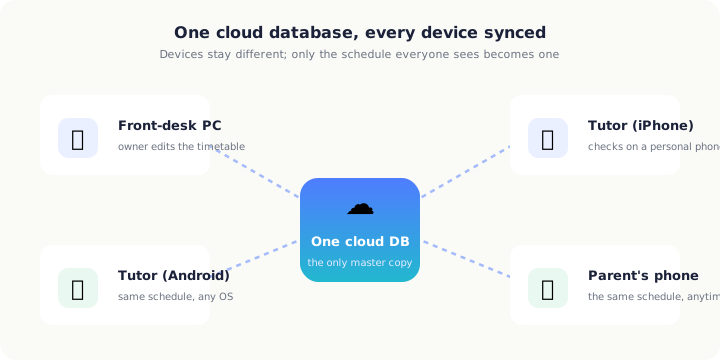 Devices stay different; every one of them reads a single cloud database
Why the "every device is different" problem happens
The owner works at a large PC screen for admin. Part-time tutors check the schedule on their phones before a shift or on the move. And those personal phones are a mix of iPhone and Android.
This isn't unusual. In Japan, survey data puts main-device share at roughly iPhone 48.3% and Android 51.4% — almost even (MMD Labo, "September 2025 Smartphone OS Share Survey"). Assuming "all our tutors are on iPhone" simply doesn't hold once you employ several part-timers, and leaning only on one OS will leave someone behind.
On top of that, the common ways centres "share" a schedule are exactly the ones that never become one thing across devices:
- Shared Excel files: once someone edits, everyone else is looking at an old copy until a new version is redistributed.
- Paper timetables: the one sheet on the wall is the truth, and tutors outside the room can't see it.
- Device-local storage: the schedule lives only inside that one phone; from any other device it may as well not exist.
- Sharing via chat-app albums and notes: you can drop images or memos, but the latest version scrolls away and edits never collect in one place.
What they share is this: the "correct schedule" exists as scattered copies across devices, and nobody can be sure which one is current.
Why "one cloud database, synced" works structurally
The fix for the device problem is not to standardise the devices. Let them stay different. Instead, make the schedule data something that every device looks up from one single place. That's what sync over a cloud database means.
Using the cloud is no longer a special choice. As of 2024, 80.6% of companies in Japan use cloud services, with "file storage and data sharing" and "schedule sharing" among the top uses, and about 90% of users reporting real benefit (Japan's Ministry of Internal Affairs and Communications, 2025 White Paper on Information and Communications). Sharing a tutoring schedule is an extension of that.
1. There is one master copy of the data
Instead of scattered copies, the schedule itself exists once, in the cloud. Edit it on the front-desk PC or view it on a tutor's phone — both reference the same data. The human work of judging "which one is latest" disappears.
2. The device's OS doesn't matter
iPhone, Android, or PC — each just reads the same data in the cloud, so it doesn't matter which OS a tutor's personal phone runs. Even with iPhone at 48.3% and Android at 51.4% mixed together (MMD Labo, "September 2025 Smartphone OS Share Survey"), everyone sees the same schedule.
3. Changes reach everyone immediately
The moment you fix the timetable on the PC, it updates on tutors' and parents' phones too. No redistribution, no announcement, and far less chance of the "forgot to tell them about the change" accident.
This "centralise in the cloud, absorb the device differences" approach is used in education too. As learner devices reach about 1.1 per student under Japan's GIGA School programme, cloud-based teaching-support tools take on the job of centralising device management and access control (Japan's Ministry of Education, FY2023 Survey on the State of ICT in Schools, and related plans). The more devices there are, the more valuable it is to gather the data into one place.
But sync is not a cure-all: three traps
Trap 1: Syncing to personal devices increases leak risk without controls
If your schedule and student information sync to a tutor's personal phone, that means the data spreads to devices you don't manage. Yet small businesses haven't kept up with the controls. Survey data shows about 60% of small and mid-sized firms have not put organisational security measures in place (60.8% have no documented rules, 60.2% have no emergency response structure, 62.1% have no response to new threats), and the top reason for not investing was "we don't feel the need," at 44.3% (IPA, "FY2024 Survey on Information Security Measures at Small and Medium Enterprises").
It is apparent that the organisational security measures that need to be undertaken are not progressing.
— IPA, "FY2024 Survey on Information Security Measures at SMEs" report (May 2025)
A departed tutor's phone still showing the schedule, a lost personal phone — uncontrolled BYOD (using personal devices for work) amplifies leak risk in exchange for convenience. Being able to sync, and deciding who may see how much, are two different things.
Trap 2: "The vendor handles it, so it's safe" is a misunderstanding
Key measures for cloud use include "incident response" and "preventing misconfiguration," and security rests on a shared-responsibility model between provider and user. It is stated explicitly that "leaving it to the vendor" does not make you safe (IPA, "Guide to Safe Use of Cloud Services for SMEs," version 4.0). Misconfigure a sharing setting and your schedule becomes visible to the wrong people; during an outage, the very premise that "everyone always sees the same schedule" collapses.
Trap 3: Sync depends on the network. If the connection drops, it stops
Real-time sync only works when there is a connection. In survey data, top reasons for not using the cloud include "concern about leaks and security" (about 25–32%) and "concern about network stability" (about 15%) (Japan's Ministry of Internal Affairs and Communications, 2024 Communications Usage Trend Survey). In a room with weak signal, an unstable connection, or offline, sync does not function. Use it without noticing "when did this last sync," and you risk mistaking an old schedule for the current one.
How E-Space's sync is built on this premise
E-Space is built so that three things — iOS, Android, and the web console (console.e-space.app) — share one cloud database. Arrange the schedule on the front-desk PC, have tutors check it on their own phones whether iPhone or Android, and let parents view it on their phones — all of them reference the same data. The devices stay different; only the schedule everyone sees becomes one.
Even when tutors' personal phones are a mix of iPhone and Android, each just installs the app on their own device and reaches the same schedule. Fix the timetable at the front desk and it updates on tutors' and parents' screens on the spot. No redistributing Excel, no reposting paper, no saying "this one is the latest" again in a chat app. For the bigger picture on streamlining schedule management, see how to streamline class scheduling.
Against the traps of sync, what matters is not "show everything because it's convenient," but being able to separate who can see what by role, and using it with the understanding that a connection is required. Sync is not magic; only used correctly does "the same schedule on every device" actually hold.
A checklist to decide on adoption
The more that apply, the clearer the sign that the device-mismatch problem is happening (or about to).
- ☐ You have several tutors, each checking the schedule on a personal phone.
- ☐ Tutors' devices are a mix of iPhone and Android.
- ☐ Front desk and admin use a PC while on-site checks happen on phones — the devices are split.
- ☐ You share the schedule via Excel, paper, or a chat app, and sometimes get lost over "which is the latest."
- ☐ After fixing a timetable, you've had cases of failing to tell tutors or parents.
- ☐ You have no rule for the centre's data remaining on personal devices.
- ☐ There are situations where the connection at the room or on the move is unstable.
The first four are "problems sync solves"; the last two are "things to settle before adding sync" (controls and the network premise). Considering both together shrinks the gap you'll feel after adopting it.
E-Space pricing
| Plan | Monthly | Notes |
|---|---|---|
| Free | ¥0 | Core features at no cost |
| Basic | ¥2,980 | For mid-sized centres |
| Premium | ¥9,800 | More capabilities |
| Unlimited | ¥19,800 | No limits |
Conclusion
The heart of the device-mismatch problem isn't that there are many kinds of devices — it's that the schedule data sits as scattered copies across them. The fix isn't to standardise devices but to put the master copy in one cloud database that every device reads. That delivers the same schedule to a tutor team mixing iPhone and Android, to the front-desk PC, and to parents' phones alike.
At the same time, sync is not a cure-all. Syncing to uncontrolled personal devices raises leak risk (IPA survey), the cloud isn't safe when left to the vendor (IPA guide), and sync stops when the network drops (MIC survey). Hold the convenience and the preconditions together, and only then does "the same schedule on every device" start running reliably.