
"Sorry, could we move next week's lesson?" From that one message, the work begins: checking the tutor's open slots, cross-referencing the student's other commitments, and confirming back with the parent. At one-on-one tutoring centers, make-up classes quietly consume 3–5 hours a month whenever the rules are left vague.
This article covers the 5 rule elements that make rescheduling fair, leak-proof, and not over-discounted, the accidents that spreadsheet-based management tends to cause, and a parent-facing policy template you can copy. For context, this is written from the perspective of Japanese tutoring centers (known as juku), where individualized lesson slots make make-up requests especially common — but the rule design applies to any one-on-one teaching business. It's aimed at center directors who want the make-up system in place before exam season ramps up.
Why Make-Up Classes Wear Tutoring Centers Down
Why one-on-one centers see more make-ups than group classes
In group classes, "if you miss it, you miss it" is often the norm. But one-on-one centers reserve a specific slot for each student, so parents naturally feel "we should make up the lesson we paid for." Because individualized instruction is usually 1-to-1 or 1-to-2/3, an absent student leaves that slot's room and tutor capacity empty. Parents are also more likely to feel "we paid tuition and lost out," so make-up requests arise on their own.
School events, term exams, illness, club-activity trips — for one-on-one students, all of these can become a reason to reschedule. Students who finish a term with zero make-ups are the minority, and the larger your center grows, the more monthly make-up requests scale right alongside it.
For scheduling around exam periods specifically, see our piece on surviving mid-term exam season operations.
The hidden cost of make-ups (a 15-minute-per-request estimate)
Break down the workflow for a single make-up request and these steps appear:
- Receive the requested make-up date/time from the parent (chat or phone)
- Check the assigned tutor's open slots
- Confirm no other student already occupies the target slot
- Reply to the parent with candidate times
- Once decided, send confirmation to both the tutor and the parent
- Manually enter the make-up details into the calendar or spreadsheet
Even an experienced director spends 10–15 minutes per request. At 20 make-up requests a month, that alone burns 3–5 hours — time that could go to lesson prep, parent relationships, or hiring.
Without rules, it becomes "whoever asks loudest wins"
At centers that haven't put make-up rules in writing, problems like these tend to surface:
- Past exceptions ("you let us reschedule same-day before") become the new baseline
- It looks like only the loudest parents get accommodated
- Tutors handle requests differently, breeding resentment between families
- At withdrawal, parents ask for a refund of "unused make-up sessions"
Even when rules exist, verbal-only communication leads to "no one told us that" disputes later. Stating the rules in writing and getting agreement at enrollment is the single most effective way to prevent trouble down the line (for the legal enforceability of specific clauses, please consult a lawyer).
5 Rule Elements and a 3-Pattern Comparison
A one-on-one center's make-up rules are built mainly from the following 5 elements. How you design each one significantly changes the operational impact.
Element 1: Request deadline (day before / same day / after the fact)
The request deadline defines "by when must a parent contact you to qualify for a make-up." Many centers use "up to 24 hours before the lesson" as the baseline, though some allow "up to the lesson start time on the day" to accommodate sudden illness. The wider you open same-day or after-the-fact rescheduling, the heavier the coordination load.
Element 2: Monthly make-up cap (unlimited squeezes your operations)
For centers that advertise "unlimited make-ups," room utilization tends to become inefficient in practice. As make-up slots pile up, managing room capacity gets harder, and you may run out of slots to take on new students. Setting a cap — two per month, or within 50% of the monthly lesson count — is generally recommended for healthy operations.
Element 3: Defining eligible absences (illness, school events, personal reasons)
"Any reason qualifies" turns nearly every absence into a make-up request. Some centers split reasons into "illness / excused school events" and "personal reasons (trips, social plans, etc.)" and apply different rules to each. Classifying is reasonable in itself, but vague criteria create friction with parents, so define the lines as clearly as you can.
Element 4: Cancellation / reschedule fees (don't over-discount)
Making make-ups "free, any number of times" means the center fully absorbs the cost of delivering the lesson. Some centers charge a fee for requests past the deadline or beyond the cap. That said, set amounts carefully so they don't amount to an excessive penalty clause under consumer-protection law (consult a lawyer if unsure).
Element 5: Whether the assigned tutor can change
A make-up slot may mean a different tutor. If you don't clarify "make-ups are with the assigned tutor only" versus "another tutor is acceptable," you'll get "this isn't our usual teacher" complaints. If you allow changes, explain it at enrollment or state it in writing.
3-pattern comparison by strictness
| Element | Lenient | Standard | Strict |
|---|---|---|---|
| Request deadline | Up to lesson start, same day | By 6 p.m. the day before | 3 days in advance |
| Monthly cap | Unlimited | Up to 2 per month | Up to 1 per month |
| Eligible reasons | All absences | Illness / excused only; personal reasons excluded | Illness only (with documentation) |
| Cancellation fee | None | One lesson's fee if past deadline | Same-day absence not eligible |
| Tutor change | Not restricted | Allowed (with prior consent) | Not allowed in principle |
| Operational impact | High coordination cost; complex slot management | Balanced; the common choice | Stable operations; weaker marketing appeal |
Practically, choose the pattern that fits your target families (exam-focused vs. long-term enrollment).
4 Accidents That Commonly Happen with Spreadsheet / Chat Management
Accident 1: A make-up slot double-books with another student
Even with a spreadsheet or Google Calendar, double-bookings happen when real-time updates can't keep up. "I put Student A's make-up at 2 p.m. on the 9th" while another tutor "put Student B's make-up in the same slot" — the more people share the management, the more likely this gets. When it surfaces on the day, one student and parent end up owed an apology.
As we noted in our article on digitizing attendance tracking, a management setup where information isn't gathered in one place produces more mistakes as you scale.
Accident 2: Cross-month make-ups throw off your counts
When a make-up carries into the next month, that month's remaining-make-up tally stops adding up correctly. If your spreadsheet is organized by month, "last month's make-up was used this month" ends up split across different sheets, and verifying it takes time.
Accident 3: Agreed over chat, but the tutor never heard
Even if the back-and-forth with a parent is settled in a messaging app (like LINE), that information may never reach the assigned tutor. The result: a student shows up for a make-up the tutor didn't know about, or another lesson was already booked in that slot on the day.
Accident 4: Unused make-ups become a billing dispute at withdrawal
If, at the point of withdrawal, a parent says "we still have two make-ups left," it may not match the center's records. When you depend on chat history or handwritten notes, verifying who's right is hard, and the dispute drags on.
Unused make-ups can also become a trigger for withdrawal in the first place — managing the leading signs of churn is its own operational discipline worth building deliberately.
Managing Request-to-Confirmation on a Single Screen
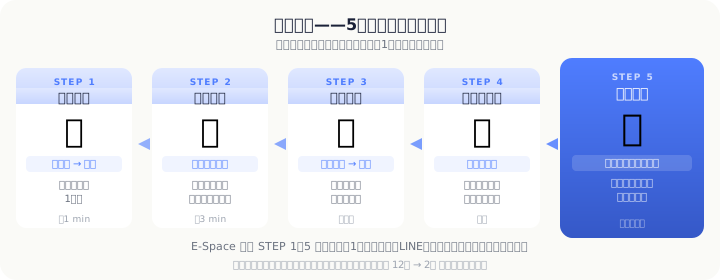 A 5-step flow that follows a make-up from "request" to "confirmed" to "recorded" on one screen
Step 1: Consolidate the request channel
When make-up requests arrive across "chat app, phone, in person, and the app," you lose the ability to trace what was decided where. The first step is to decide "make-up requests come through in-app chat only" and to state that to parents as a rule.
Step 2: Make open slots visible (student, tutor, room — all three)
To find a slot where a make-up fits, you need to see three axes at once: "is the student free at that time," "is the assigned tutor open," and "is there a free seat in the room." If you can't view these three in real time, no amount of digitization reduces the back-and-forth of confirmation.
Step 3: Notify everyone involved when the make-up is set
The moment a make-up date is fixed, the same information needs to reach the assigned tutor, the parent, and the administrator. Rather than person-dependent "someone tells someone," having the system push the notification automatically is the shortest path to eliminating missed handoffs.
Our 2026 comparison of tutoring management apps looks at how this kind of notification integration is weighed when selecting a tool.
Step 4: Record monthly make-up activity
Being able to check "how many make-ups occurred and how many were used this month" at month-end feeds next month's operational improvements. Keeping an eye on the make-up usage rate lets you spot "students with make-ups piling up unused" early — which doubles as a churn-risk alert.
Template: Make-Up Policy Document (for Parents)
Below is a sample parent-facing make-up policy. Rewrite the center name, fees, and lesson counts to match your reality.
[Guide to Make-Up Classes]
This is to explain the make-up class policy at ____ Tutoring Center (the "Center").
1. Eligible absences
Make-up classes apply to absences due to illness and school events (school trips, sports days, and similar excused events). Absences for personal reasons (travel, conflicts with other activities, etc.) are, in principle, not eligible for make-ups.2. Request deadline
To request a make-up class, please contact us via in-app chat at least 24 hours before the start of the lesson. Please understand that requests after the deadline cannot be accepted.3. Make-up cap
Make-up classes are capped at two per month (for monthly plans of four lessons or more). For make-ups beyond the cap, please consult us separately.4. About the assigned tutor
Make-up classes are taught by the assigned tutor when that tutor has an open slot. If none is available, another tutor may teach the session. Thank you for your understanding in advance.5. Expiration
Please use any make-up class by the end of the month following the month of absence. After that, it becomes void.6. Exceptions
In the following cases, we will respond individually regardless of the above rules:
・Attendance suspension under infectious-disease law (influenza, etc.)
・Unavoidable circumstances on the parent's side (please consult in advance)If you have any questions, please feel free to ask our center staff.
E-Space's Make-Up Management Features
E-Space provides the following features for managing make-up classes:
- Calendar-based make-up booking: While viewing the missed lesson slot, set the make-up date/time directly on the calendar. It works like dragging a slot to move it, keeping input effort to a minimum
- Automatic notifications to everyone involved: When a make-up is confirmed, the assigned tutor, parent, and administrator are all notified at the same time. Missed handoffs can't happen by design
- Real-time tracking of remaining make-ups: Each student's remaining make-up count updates automatically in sync with the calendar. The month-end manual tally disappears
- Chat: Handle make-up requests, confirmations, and changes inside E-Space's chat. No more scrolling back through messaging-app history
| Plan | Monthly | Highlights |
|---|---|---|
| Free | ¥0 | Core features at no cost |
| Basic | ¥2,980 | For mid-sized centers |
| Premium | ¥9,800 | More capabilities |
| Unlimited | ¥19,800 | No limits |
Conclusion: Lock Make-Ups Down on Two Axes — Rules + Operations
Managing make-up classes rests on two axes: "putting the rules in writing" and "systematizing the operations." Either one alone falls short.
- Even with the rules set, as long as you manage on chat apps or spreadsheets, missed handoffs and double-bookings keep happening
- Even with the system in place, if the scope and deadline of make-ups aren't decided, interpretation gaps with parents arise
Pick the 5 rule elements in this article to fit your center's reality, put them in a written document for parents, and build an environment where you can follow a make-up from request to confirmation to use on a single screen. That's the shortest path to cutting 3–5 hours of monthly coordination.
E-Space's Free plan needs no credit card. From the day you decide to change how you manage make-ups, try running it on your real data.