
Still tracking student attendance on a printed roster, a Google Sheet, or a string of WhatsApp messages? If your tutoring business has fewer than 10 students, you can probably get away with it. But once you're managing 20 or 30 learners — across multiple courses, multiple tutors, and a steady stream of makeup class requests — those workarounds start to cost you real time and real trust.
This article walks you through the business case for digital attendance tracking and a practical 5-step process for making the switch. Whether you run a solo private tutoring practice, a homeschool co-op, or a small after-school program, the same principles apply.
Why Spreadsheets and Messaging Apps Are Holding Your Tutoring Business Back
The real cost of fragmented records
Most independent tutors and small tutoring businesses piece together their attendance tracking from a combination of:
- A printed attendance sheet or paper sign-in roster students fill out each session
- Absence notifications via WhatsApp, SMS, or email — then manually copied into a spreadsheet
- Makeup class credits tracked on a sticky note, a separate column, or (the classic) memory
The fundamental problem is that information lives in too many places. Your attendance record is in one tab, the absence messages are in your phone, the makeup class count is in your head. Every time a parent asks "how many makeup sessions does my child have left?", you have to cross-reference three sources before you can answer — and that answer might still be wrong.
The second, less obvious cost is communication gaps that erode parent trust. Missing a follow-up after an absence, failing to remind a family about a rescheduled session, or losing track of a makeup class that was supposed to happen last month — these are the operational slip-ups that prompt a parent to quietly start looking for another tutor.
What changes when you switch to a dedicated tutor attendance tracking app
| Before | After |
|---|---|
| Absence reported via WhatsApp, manually entered into spreadsheet | Parent reports absence in the app — automatically logged |
| Makeup class credits tracked separately, updated by hand | Remaining makeup sessions update in real time |
| Checking attendance means opening multiple tabs or notebooks | Check from your phone in seconds |
| Sharing updates with co-tutors requires a separate message | Notifications go out automatically |
Moving to a dedicated system does not require a technical background. With the right tool and the right rollout order, the transition can happen in under a month.
Before You Switch: 3 Things to Clarify First
1. Map out how attendance actually flows today
The most common reason digital rollouts stall is that operators skip this step. Before picking a tool, write down the answers to:
- Who receives absence notifications — just you, or multiple tutors or coordinators?
- Where does that information currently get recorded?
- How do you track makeup class entitlements and how many a student has used?
- When do parents need to hear back from you after an absence?
- Does your end-of-month tuition billing depend on attendance data?
Once you have this on paper, you'll spot the gaps that any new system needs to cover — and avoid discovering them mid-rollout.
2. Set a realistic first goal
"Move everything to the app at once" is the mindset that causes most digital transitions to fail. A far more durable approach is to pick one narrow goal for the first two weeks: "Parents report absences through the app only," or "I record attendance in the app after every session." Nail one workflow before adding the next. Systems that try to do everything on day one typically do nothing well by month two.
3. Give families enough lead time
Switching to a new communication channel is a change for parents too, not just for you. Build in at least two weeks between your announcement and the go-live date. The least disruptive timing tends to be the start of a new term, the beginning of a new school year, or just after a school break — moments when families are already adjusting their routines and are more receptive to new procedures.
5 Steps to Switch Your Tutoring Business to Digital Attendance Tracking
Step 1: Choose the right tool for tutors
Not all scheduling and attendance apps are built for tutoring businesses. Generic tools — form builders, project management apps, or spreadsheet automation — force you to build the attendance logic yourself, and they have no concept of students, courses, or makeup classes.
Drawbacks of generic tools (Google Forms, Notion, etc.):
- No built-in link between students, sessions, and courses
- You have to build makeup class tracking logic from scratch
- No parent notification system included
What to look for in tutoring business management software:
- Mobile-first design — you and your co-tutors should be able to mark attendance from a phone, mid-session
- A parent-facing flow where families report absences directly in the app
- Automatic makeup class tracking that decrements when a makeup session is completed
- Built-in messaging so absence follow-ups and session reminders stay in one place
- A free plan with no credit card required, so you can test with real data before committing
E-Space is built specifically for this use case: mobile apps for iOS and Android, a parent-facing absence reporting flow, calendar-linked attendance records, and an integrated chat feature. The free plan has no time limit, so you can run a full pilot before upgrading.
Step 2: Import your existing student data
Once you've chosen your tool, the next step is getting your student roster into the system. For most tutoring businesses, that means entering:
- Student name, grade or year level, and enrolled course(s)
- Parent or guardian email address for the invitation
- Current makeup class balance (if students already have unused credits, enter those as the starting value)
This step sounds tedious, but there is a practical shortcut: start with five students, not your full roster. Pilot with a small group, confirm the workflow makes sense end-to-end, then add everyone else. You will catch configuration issues early rather than discovering them after you have already announced the switch to 30 families.
Step 3: Invite students and parents to the platform
This is typically the step that takes the most calendar time — not because it's technically difficult, but because people respond at different speeds.
A few things that make onboarding smoother:
- Use an invitation code or link rather than asking parents to search for the app and type in their details. One tap to join is the only acceptable friction level.
- Be clear about the cutover date. "You can use either WhatsApp or the app for now" guarantees most families will keep using WhatsApp. Set a specific date — "From September 8, all absences go through the app" — and communicate it in writing.
- Offer a short walkthrough for parents who need it. A screenshot-annotated one-pager, a short video, or five minutes at pickup time goes a long way with families who are less comfortable with apps. For a homeschool co-op or after-school program, a group demo at the next parent meeting works well.
Step 4: Write down your operating rules and share them
An app is not a policy. Even after families are onboarded, unclear expectations create confusion. Before you go live, decide and communicate:
- Absence deadline — By what time must a family notify you of an absence? (A common standard is one hour before the session starts.)
- Makeup class request process — How does a family request a rescheduled session? Through the in-app chat, by booking a slot directly, or by messaging you separately?
- Emergency exceptions — Is there a phone number to call if something happens in the final 30 minutes before a session?
Put these rules in a short parent handbook — even a single page — and send it digitally when you invite families to the platform. It prevents "I didn't know that" conversations down the line.
Step 5: Run a parallel period for the first month
In the first four weeks after go-live, some families will forget to use the app. That's normal. Don't cut off the old channel abruptly. Instead, accept absences through both channels while gently redirecting people to the app each time they contact you via WhatsApp or SMS.
At the end of week four, review who hasn't engaged with the app yet and follow up individually. By month two, you'll have enough data to know who needs additional support and who has fully switched over. From that point, you can confidently retire the old process.
Common Questions from Tutors Making the Switch
Q: What if some parents just won't use the app?
A: Don't expect 100% adoption in the first week. Start by making the app attractive to parents who are already open to it. Their positive word-of-mouth — "it makes reporting absences so much faster" — will bring the holdouts along more effectively than any announcement you send.
Q: My students are minors. How is their data protected?
A: Reputable tutoring management apps are built with data privacy in mind. E-Space uses Firebase infrastructure with industry-standard security. If you're operating in the US or UK, check that the provider has a clear privacy policy and an understanding of FERPA or GDPR; E-Space's privacy policy is publicly available at e-space.app/en/privacy.html.
Q: Does attendance data connect to tuition billing?
A: You can review attendance records inside E-Space to inform your end-of-month tuition calculation. Direct billing integration is on the product roadmap. For most small tutoring businesses, having a clean attendance log to reference — rather than reconciling across a spreadsheet and three messaging threads — is already a significant improvement.
Q: I'm a solo tutor with only 8 students. Is this worth it?
A: Solo operators often benefit most from the switch. Right now, you're the single point of failure for every absence notification and makeup class record. A dedicated after-school attendance system removes that burden: parents log their own absences, the app keeps the count, and you spend zero time on manual data entry. That's time you can put back into lesson prep or growing your student roster.
E-Space Attendance Features at a Glance
E-Space's core feature set maps directly to the tutor attendance tracking workflow:
- In-app absence reporting — Parents report an absence from the mobile app; you and any co-tutors receive a push notification instantly, no WhatsApp thread required.
- Calendar-linked attendance records — Each session is tied to the class calendar. Attendance for the month is visible at a glance.
- Automatic makeup class tracking — When a student misses a session, a makeup credit is created automatically. When the makeup session is completed, the balance decrements.
- Built-in chat — If a parent needs to add context to an absence or discuss rescheduling, the conversation stays inside the app alongside the attendance record.
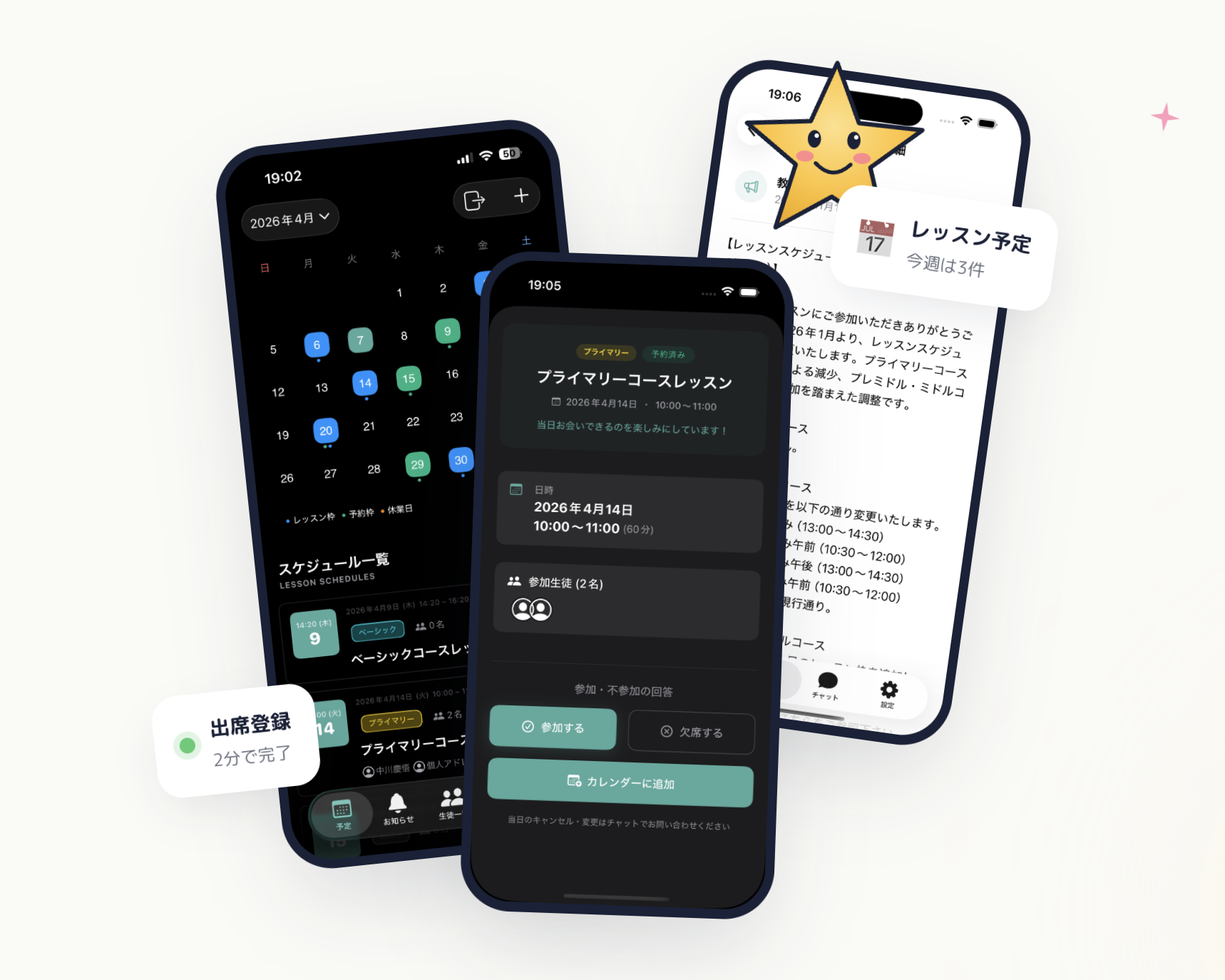 E-Space — calendar, student management, and chat notifications in a single app
| Plan | Monthly | Best for |
|---|---|---|
| Free | $0 | Solo tutors getting started |
| Basic | $19.80 / mo (approx. ¥2,980) | Growing tutoring practices |
| Premium | $65 / mo (approx. ¥9,800) | Multi-tutor programs |
| Unlimited | $132 / mo (approx. ¥19,800) | Large after-school operations |
Wrapping Up
Switching from spreadsheets and messaging apps to a dedicated homeschool attendance app or tutoring management platform is not a technical project — it's an operational one. The technology is straightforward. The work is in mapping your current workflow, setting clear expectations for families, and giving the new system enough runway to become a habit.
The tutors who struggle with this transition try to do everything at once. The ones who succeed pick one workflow, get it right, then expand from there.
If your student roster is still under 20 or 30, now is the right time to put the system in place. Waiting until you're overwhelmed is the most common — and most avoidable — mistake in a growing tutoring business.
E-Space's free plan requires no credit card. Set up your classroom, add five students, and see how the attendance flow works with your real data. One week of hands-on testing will tell you everything a feature list cannot.