
If you've searched for "tutor management software" recently, you'll have found a wide range of options — from heavyweight practice management suites designed for large coaching centres, to generic calendar and booking tools that weren't built for education at all. Choosing the wrong one means either paying for features you'll never use, or wrestling with a tool that lacks the education-specific logic your practice actually needs.
This guide walks through five evaluation criteria that matter for independent tutors, homeschool co-ops, and small after-school programs. It ends with a self-assessment checklist you can use before any demo or free trial.
5 Criteria for Evaluating Tutor Management Software
1. Pricing transparency
The tutoring software market is split between tools with publicly listed pricing and tools that require you to contact sales for a quote. For a solo tutor or a small program operator, the "contact us for pricing" model is a red flag — not because the cost is necessarily high, but because you cannot make an informed decision without knowing the number upfront.
Questions to ask before committing:
- Is the monthly price listed publicly on the website?
- Does the cost scale with student headcount? If so, what does your current roster cost, and what will it cost if you grow by 30%?
- Are there setup fees, annual contract requirements, or cancellation penalties?
- Is there a genuinely free tier — not just a 14-day trial — that lets you test the tool before spending anything?
2. Mobile access for tutors and parents
A tutoring business is not a desk job. You and your co-tutors are in sessions, on the move between locations, or fielding parent messages in the evenings. If your management software only works well on a desktop browser, it will not get used consistently — and inconsistent usage is worse than no system at all.
What to verify:
- Are there native iOS and Android apps, or is the mobile experience a browser wrapper?
- Can tutors mark attendance from their phone mid-session without needing to log into a web console?
- Can parents report absences or request makeup classes from their phone in under 30 seconds?
- Do push notifications work reliably for both tutors and parents?
3. Education-specific features
Generic scheduling tools — Google Calendar, Calendly, Notion — can be adapted for a tutoring practice, but you end up building the education logic yourself. That means manual makeup class tracking, no parent-facing absence reporting flow, and no concept of a student roster connected to a course schedule.
Core features worth prioritising for a tutoring business:
- Student roster management — Students linked to courses and tutors, not just slots in a calendar.
- Makeup class tracking — When a student misses a session, a makeup credit should be created automatically and decremented when used.
- Parent-facing absence reporting — Parents should be able to report an absence directly in the app, triggering a notification to the tutor without requiring a WhatsApp message or email.
- In-app messaging — Communication between tutors and parents should stay in the same tool as the schedule, so context is never lost.
- Push notifications for schedule changes — When you update or cancel a session, everyone affected should hear about it automatically.
4. Setup friction and ongoing maintenance
Software that requires a multi-hour onboarding call, a custom implementation process, or dedicated IT support is designed for enterprises — not for a tutoring practice where the owner is also the main instructor. The right tool for a small tutoring business should be self-serve: you set it up yourself, invite your students and parents, and start using it the same day.
Practical tests:
- Can you go from sign-up to a working classroom with real students in under an hour?
- Does the onboarding use an invitation code or link so parents join with one tap?
- Is the UI clear enough that a parent who is not particularly tech-savvy can figure it out without a walkthrough?
5. Customer support quality
Even simple software produces questions. The difference between a tool that builds trust and one that frustrates is whether someone answers when something goes wrong. For a small tutoring practice, enterprise-tier SLA guarantees are overkill — but basic responsiveness matters.
- Is there a help centre or documentation you can search yourself?
- Is in-app or email support available on the free plan, or only for paying subscribers?
- When you submit a support request, do you get a real answer within 24–48 hours?
Self-Assessment Checklist Before You Choose
Before you start any trial, answer these questions about your current setup. Your answers will tell you exactly which features matter most for your practice.
| Question | What it tells you |
|---|---|
| How do parents currently report absences? | If the answer is "WhatsApp or text," you need a tool with a parent-facing absence flow. |
| How do you track makeup class credits? | If the answer is "a spreadsheet or memory," automated makeup tracking will save you the most time. |
| Do you have co-tutors who need to see the schedule? | Multi-user access and role-based permissions matter more than a solo practice might assume. |
| How many students do you have now, and where do you want to be in 12 months? | Choose a tool whose pricing makes sense at both your current and projected size. |
| Do parents expect to be notified automatically when sessions change? | If yes, manual notification tools (email, WhatsApp) will create too much overhead at scale. |
| How tech-comfortable are your parents on average? | If parents are less comfortable with apps, prioritise tools with the simplest possible onboarding. |
Where E-Space Fits in This Picture
E-Space was built specifically for small and medium tutoring practices, after-school programs, and homeschool co-ops that have outgrown WhatsApp and spreadsheets but don't need an enterprise management suite.
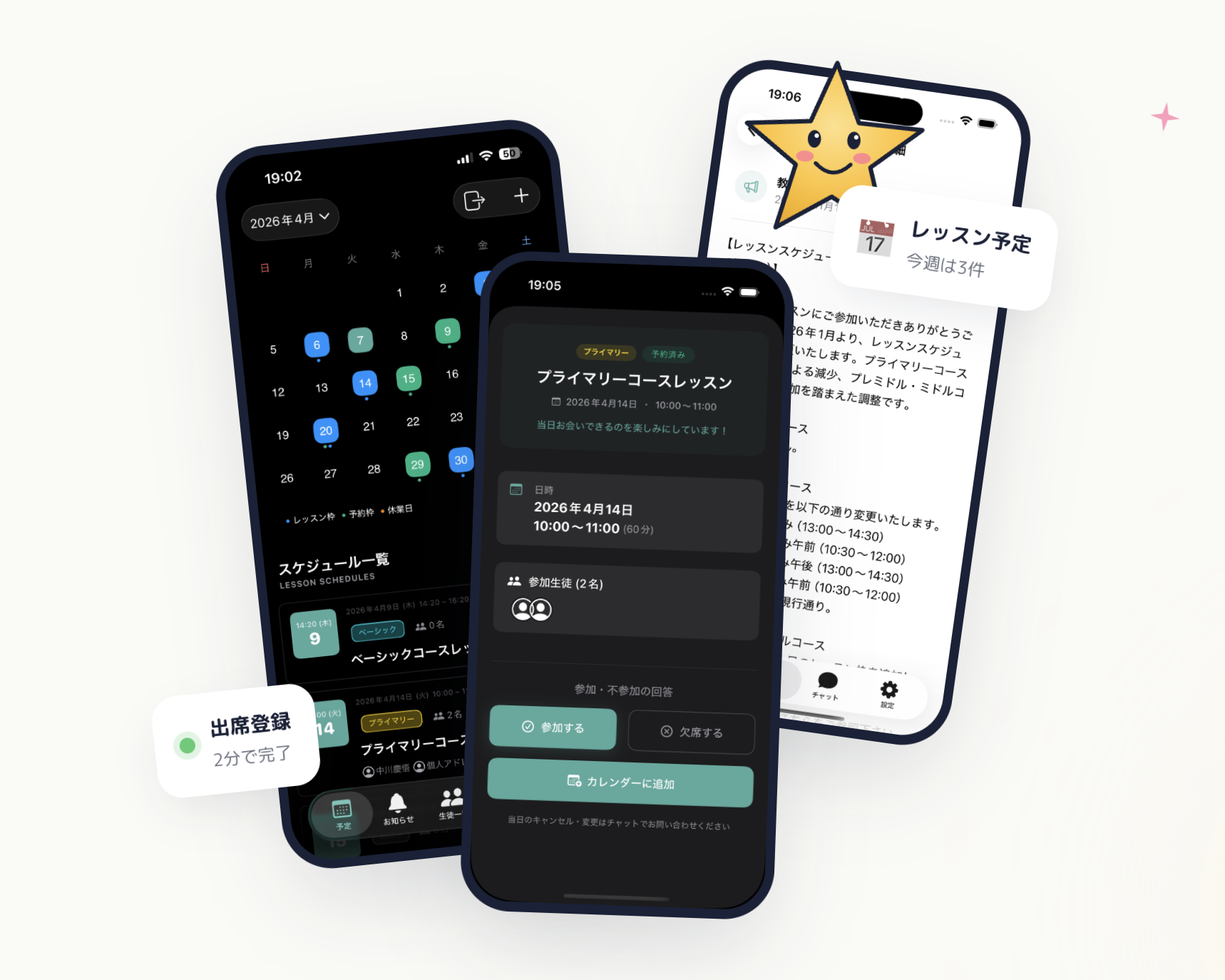 E-Space — calendar, student management, and chat notifications in a single app
Measured against the five criteria above:
Pricing transparency: All four plans — Free ($0), Basic ($19.80/mo), Premium ($65/mo), and Unlimited ($132/mo) — are listed publicly on the website. The free plan has no time limit and requires no credit card, and every paid plan includes a 1-month free trial, so you can run a genuine pilot before spending anything.
Mobile access: E-Space ships native iOS and Android apps. Tutors mark attendance from their phone. Parents report absences from their phone. Push notifications work on both platforms without requiring anyone to open a browser.
Education-specific features: Student roster management, makeup class tracking, parent-facing absence reporting, in-app messaging, and push notifications for schedule changes are all included — not bolted on as add-ons.
Setup friction: You can go from sign-up to a working classroom in under an hour. Students and parents join using an invitation code — one tap, no account setup required on their end.
Support: The E-Space team is small, which means response times are personal rather than institutional. If you hit a real problem, you hear from a person who knows the product — not a support queue bot.
| Plan | Monthly | Best for |
|---|---|---|
| Free | $0 | Solo tutors getting started |
| Basic | $19.80 / mo (approx. ¥2,980) | Growing tutoring practices |
| Premium | $65 / mo (approx. ¥9,800) | Multi-tutor programs |
| Unlimited | $132 / mo (approx. ¥19,800) | Large after-school operations |
Wrapping Up: Simple Beats Comprehensive for Most Small Practices
The most common mistake small tutoring businesses make when choosing software is optimising for feature count rather than fit. A tool with 40 features you will never use creates friction every time you open it. A tool with 10 features that map precisely to your daily workflow becomes invisible in the best possible way — it just handles the admin so you can focus on teaching.
Use the checklist above before your next trial. Know what problem you are actually solving, and choose the tool that solves that problem most directly — at a price you can see upfront, on a device you already carry.
E-Space's free plan requires no credit card. Set up a classroom, invite five students, and run two weeks of real sessions through the app. At the end of those two weeks, you will know whether it fits your practice better than anything a feature comparison table can tell you.