
"Can we get away with the same summer scheduling spreadsheet one more year?" — if that question has crossed your mind in the past few weeks, you're not alone.
Summer intensives are typically the highest-revenue stretch of the year for a tutoring program, and also the hardest stretch to schedule. Unlike your regular term, students request a wide and varied number of sessions, tutor availability becomes fluid, and the same room often runs back-to-back classes from morning to evening.
This article walks through why summer schedules become structurally complex, the three places a spreadsheet workflow tends to break, and a practical way to build the schedule from tutor availability backward.
Why Summer Schedules Become Structurally Complex
Three differences from your regular term
Compared to your normal weekly schedule, summer is different on three dimensions at once.
| Dimension | Regular term | Summer intensives |
|---|---|---|
| Sessions per student | 1–2 fixed per week | 10–40 over the summer, highly varied |
| Tutor shifts | Fixed weekdays | Fluid — travel, internships, family time |
| Room usage | Afternoons / evenings only | Full days, 9 AM to 9 PM |
| Schedule changes | 1–2 per month | 10+ across the summer |
If a regular-term schedule is "days of the week × fixed slots," a summer schedule is a three-dimensional puzzle: students, tutors, and rooms each shift every day, and your job is to assemble them without double-booking anyone — or running a tutor through six straight hours that crush their focus.
Three constraints that surface during planning
Once you start drafting a summer schedule, three constraints invariably push back:
- Tutor availability — Student-aged tutors travel, attend internships, or take family trips, leaving gaps in the back half of July and early August.
- Student requests — Sports camps, family vacations, and overlapping enrollment at another program all narrow which weeks each student is available.
- Payment deadlines — Working backward from your enrollment deadline tells you the latest possible date for confirming the schedule with families.
Managing all three constraints over hallway conversations and handwritten notes guarantees that something slips through.
Where Spreadsheet Workflows Break
Pattern 1: One sheet that tries to hold everything
Pouring tutor availability, student requests, and room assignments into a single "Summer Schedule.xlsx" file feels efficient on day one and becomes unworkable by week three. The sheet expands in both directions, formula references break when you insert a row, and printing it produces a page nobody can read.
Pattern 2: Hand-copying requests from messages
This is where most errors concentrate. A parent writes "Jul 22, slot 3" in an email, and somewhere between reading it and pasting it into the schedule, a tired admin transcribes "slot 2." That single-cell shift won't be caught until the week of the session — and then the entire schedule has to absorb the correction.
Pattern 3: No source of truth after the first edit
Once a schedule is distributed, the next change scatters versions across stakeholders. The office holds a printed copy, tutors keep an emailed PDF, parents bookmarked an earlier link. By the time a change has rippled through, nobody knows which version is current.
Lock Tutor Shifts First, Then Match Student Requests
Summer schedules built from student requests upward almost always collapse. The order that works is the reverse: lock tutor availability first, then match student demand to it.
Step 1: Lock tutor availability (by mid-June)
For every day of the summer, collect each tutor's available windows. Standardize the format so it's easy to compile:
- Available: "Jul 22, 9 AM – 1 PM" — explicit start and end
- Unavailable: travel, family, or other commitments where the tutor is fully out
- Maximum consecutive days: especially for student-aged tutors, how many days in a row they can reasonably work
Stack those windows on a calendar and you get the total tutor-hours available each day. That number is the ceiling for how many sessions you can run that day — full stop.
Step 2: Collect student requests (late June)
Once the tutor envelope is firm, send a request form to families. Capture:
- Total number of sessions requested across the summer
- Subject preferences and named tutor requests
- Unavailable dates (known travel, camps, family time)
- Preferred time block — morning, afternoon, or evening
If you skip Step 1 and start by asking parents what they want, you will inevitably get more requests than your tutors can fulfill. Locking tutor capacity first and matching demand into it is what minimizes changes after the schedule goes out.
Step 3: Draft the schedule, then run it past tutors (first week of July)
Map student requests onto tutor windows and build a draft. Before sending anything to families, check three things:
- No tutor is scheduled for more than four consecutive hours without a break
- No room hosts two sessions at the same time
- No tutor is assigned an unreasonable number of distinct students
Always confirm the draft with tutors before notifying parents. If you do it in reverse and a tutor needs a change, you're now re-notifying every affected family — and your credibility takes the hit.
How the App-Driven Workflow Compares
If you use a tutoring program management app, the same workflow becomes much more compact. With E-Space, the steps look like this:
- Mark tutor availability — on the calendar, each tutor blocks out their available windows.
- Create the summer course and link student requests — set up a dedicated summer course, then attach each student with their target session count.
- Generate sessions and assign tutors — build each session, assigning a tutor and one or more students.
- Send the schedule to parents at once — when the schedule is locked, push a single notification to all participating families.
- Reflect mid-summer changes immediately — any edit updates the calendar for everyone in real time.
The single biggest difference compared to a spreadsheet workflow is this: there is always exactly one "current version". What's in the app is what's true. You no longer have to reconcile a printout, a phone screenshot, and a message thread to figure out who has the latest information.
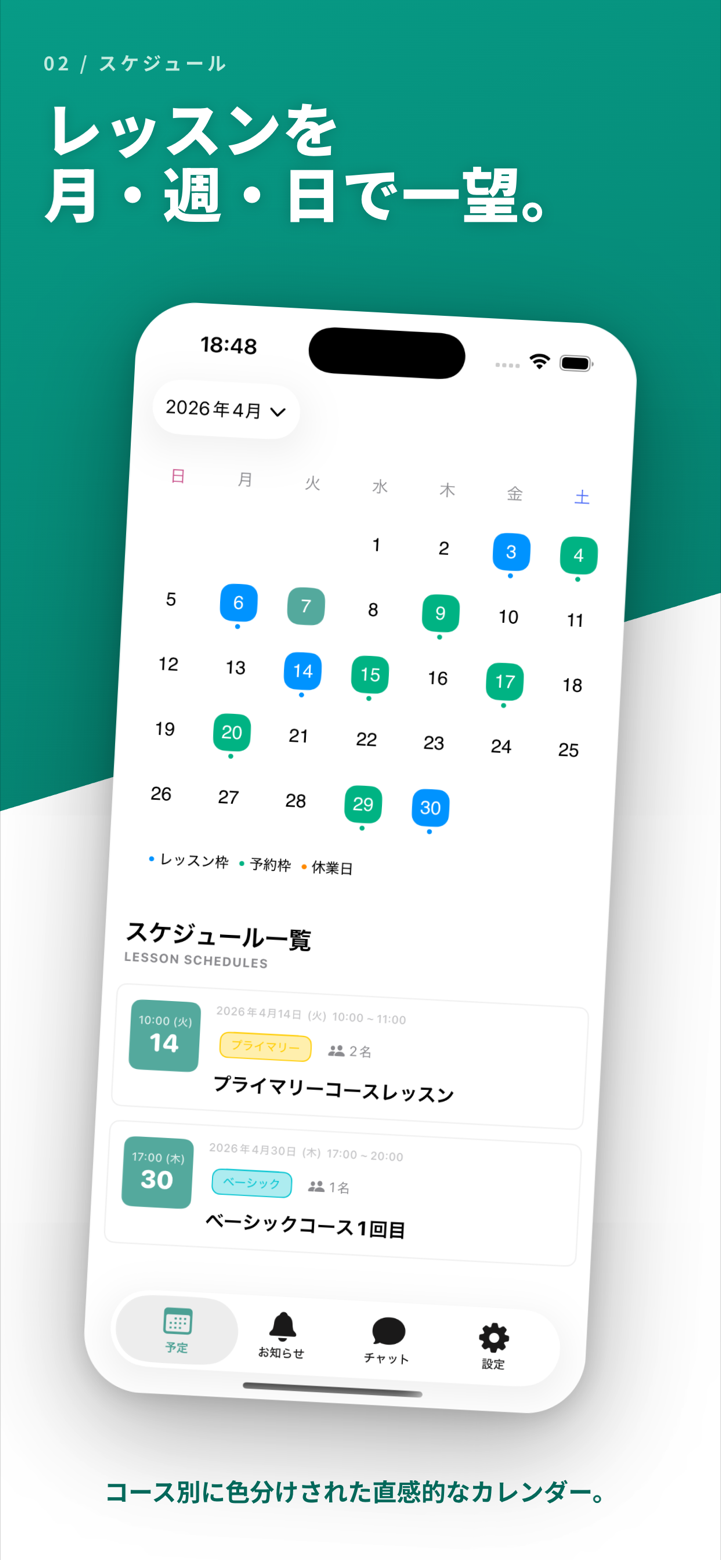 E-Space calendar view — tutor shifts and sessions live on one screen; double-bookings are blocked at the time of creation
Working Backward from Your Summer Launch
The cleanest way to time everything is to work backward from the first day of summer programming.
| Window | What to do |
|---|---|
| Late May | Prepare program materials and the enrollment one-pager |
| Early June | Open enrollment, distribute request forms |
| Mid June | Lock tutor availability for the entire summer |
| Late June | Close student request collection |
| July, week 1 | Build the draft schedule and run it past tutors |
| July, week 2 | Send the confirmed schedule and invoice families |
| July, week 3 | Final materials and classroom prep |
| Late July | Program begins |
The single most important date in this timeline is the parent notification in the second week of July. Past that point, family calendars are already locked in, and late-arriving schedules start causing enrollment cancellations rather than enrollment confirmations.
Common Questions
Q: A tutor backed out at the last minute. How do I redistribute their sessions?
A: Inside the app, you change the assigned tutor on the affected sessions. Students and parents are notified automatically, and other tutors' availability is right there on the same screen, so reassignment takes a fraction of the time it would on a printed schedule.
Q: A student cancels on the day of a session. How are makeups tracked?
A: Mark the absence in the app and schedule a makeup session. The remaining makeup balance updates automatically, so you always know how many credits each student has left for the rest of the summer.
Q: We use more than one room. How does that work?
A: Each room is treated as a separate resource on the calendar. Assigning a tutor and a student to a specific room prevents two sessions from claiming the same space simultaneously — a class of mistake that's almost impossible to avoid in a spreadsheet.
What E-Space Brings to Summer Planning
E-Space includes features that map directly to the summer workflow:
- Course-level calendars — Run summer programming alongside your regular term without mixing the two.
- Tutor-linked shift management — Bind tutor availability to sessions; double-bookings are blocked at entry.
- Bulk notifications — Send schedule confirmations and changes to all participating families in a single push.
- Built-in makeup tracking — Absences, makeups, and remaining balances stay in sync across the summer.
 E-Space — calendar, student management, and chat notifications in one app, used the same way for summer and regular-term programming
Your regular-term attendance workflow and your summer scheduling workflow live on the same platform, so the transition from one to the other is seamless.
| Plan | Monthly | Best for |
|---|---|---|
| Free | $0 | Solo tutors getting started |
| Basic | $19.80 / mo (approx. ¥2,980) | Growing tutoring practices |
| Premium | $65 / mo (approx. ¥9,800) | Multi-tutor programs |
| Unlimited | $132 / mo (approx. ¥19,800) | Large after-school operations |
Wrapping Up
The single best change you can make to summer scheduling is to build the schedule from tutor availability backward, not student requests forward. Following that order alone cuts mid-summer changes roughly in half.
If your spreadsheet workflow is already showing the cracks, June is the right month to pilot a new tool. Waiting until July is too late — there's no time for a careful migration once the summer schedule is already out the door.
E-Space's free plan requires no credit card. Add one tutor and five students, build a single summer course, and see how the planning flow holds up against your real data. One week of hands-on testing answers what a feature list cannot.